
JBO Deposit Guide: Payment Methods for Vietnam and Thailand
Making a deposit is the first step to enjoying sports betting, live casino, slots, and other entertainment products on JBO. Both the Vietnam and Thailand platforms support a range of local and international payment methods designed for fast, secure, and convenient transactions.
This guide covers every supported deposit method and limit for each platform, with fully separate step by step instructions for JBO Vietnam and JBO Thailand, since the two platforms use different banks, currencies, and processes.
Visit JBO official websites based on your location and enjoy sports betting and online live casino experience!
Become JBO Affiliate JBO Thailand JBO VietnamImportant Reminders Before You Deposit
- Always confirm you’re on the right and official JBO website or app before entering payment details. Go to JBO link to find a latest link to JBO Thailand or JBO Vietnam, then login to your JBO account.
- Never share your OTP code with anyone
- Avoid depositing through an unofficial third party or intermediary
- Use a bank account or e wallet registered in your own name, matching your JBO account details
- Enter the exact amount requested by the system, including any specific decimal figures shown
- Never use someone else’s payment account to deposit
- Enter the transfer note or reference exactly as provided, since an incorrect note can delay your transaction
- Each QR code or deposit reference is typically valid for one use only
- Keep your payment receipt or screenshot in case you need it for verification
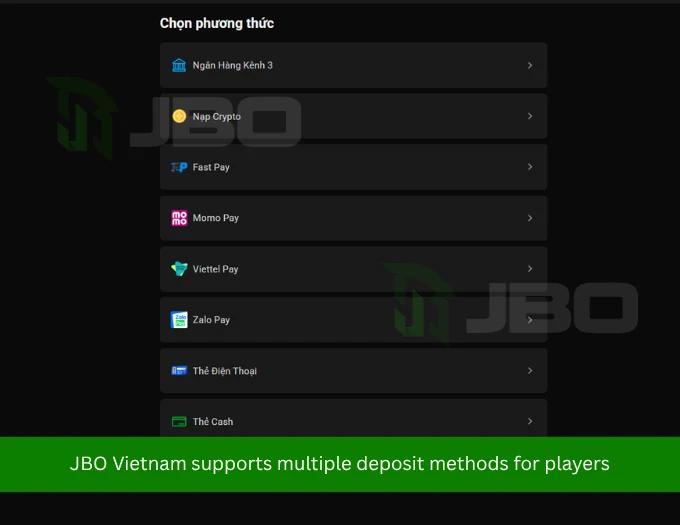
Deposit Methods and Limits on JBO Vietnam
| Method | Minimum | Maximum |
| QR Pay / Local Bank Transfer | 100 VND per transaction | 300 million VND per day |
| Crypto, Quick Payment (Channel) | 5 USDT | Unlimited |
| Crypto, Standard Payment (Invoice) | 100 VND per transaction | 500 million VND per day |
| Fastpay | 100 VND per transaction | 299 million VND per day |
| MoMo Pay | 150 VND per transaction | Up to 1 billion VND per day |
| Zalo Pay | 100 VND per transaction | 20 million VND per day |
| Viettel Pay | 100 VND per transaction | 50 million VND per transaction |
| Phone Top Up Card | 20 VND | 300 million VND per card |
| Cash Card (Affiliate members only) | 20 VND | 200 million VND |
Deposit Methods and Limits on JBO Thailand
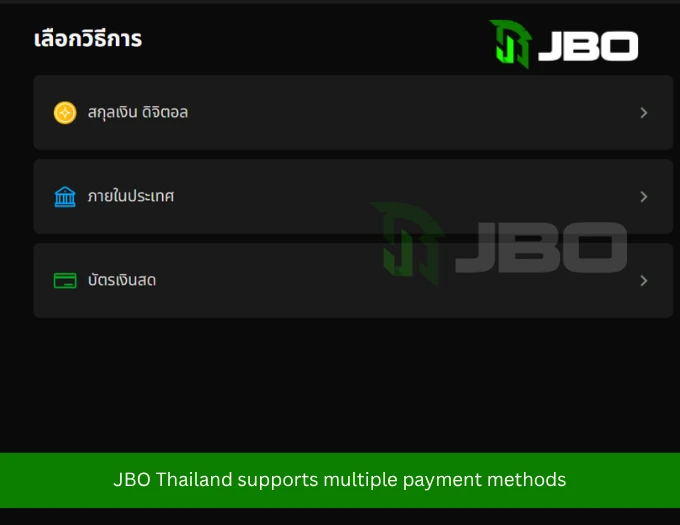
| Method | Minimum | Maximum |
| Crypto, Quick Payment | 5 USDT | Unlimited |
| Crypto, Standard Payment | 100 THB | 500,000 THB |
| Local Bank Transfer | 100 THB | 30,000 THB |
| Cash Card (Affiliate members only) | 0.01 THB | 0.01 THB (testing limit currently in effect) |
⚠️ For JBO Thailand specifically, also note:
- Local bank transfers require you to upload your payment slip within 20 minutes, or the transaction may not be recognized by the system
- The system may ask you to transfer an exact decimal amount, for example 99.99 THB instead of a round 100 THB, so the transaction can be matched and verified quickly. Always transfer the exact figure shown
- The fastest deposit and withdrawal processing window is between 5:00 AM and 10:00 PM. Transactions between 11:00 PM and 4:00 AM may be slower, since most banks run daily maintenance during this window
- Supported banks typically include Siam Commercial Bank (SCB), Bangkok Bank (BBL), and TTB, among others
- Deposits are not currently supported through Boonto, 7 Eleven, TrueMoney Wallet, or AirPay
Before depositing on either platform, make sure you’re logged in to your JBO account on desktop or mobile.
From the JBO homepage, select Deposit to see the payment methods available on your platform.
How to Deposit on JBO Vietnam
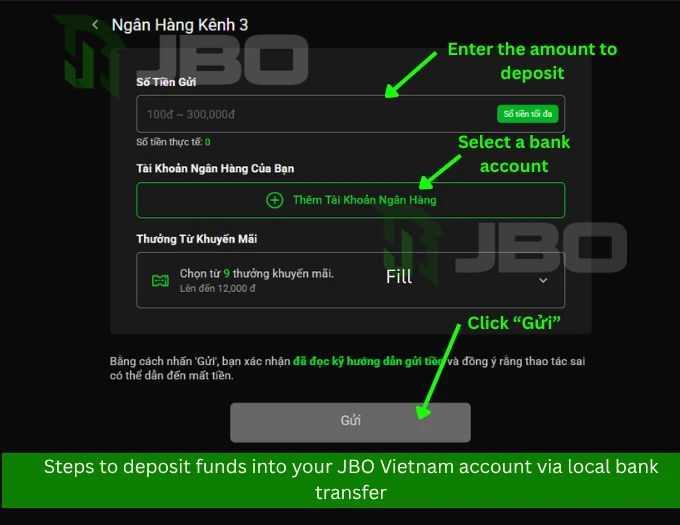
1. Local Bank Transfer or QR Pay
- Go to the Deposit section and select Local Bank
- Enter the amount you want to deposit
- Add your bank account details, verifying your identity via mobile confirmation if prompted
- The system will display transfer details or a QR code
- Open your banking app, scan the QR code, or transfer manually using the exact information provided
- Enter the transfer note exactly as instructed
- Confirm the transaction and wait for the system to process it
Note: Only use an account registered in your own name, and never alter the transfer note.
2. Crypto Deposits (USDT / BTC)
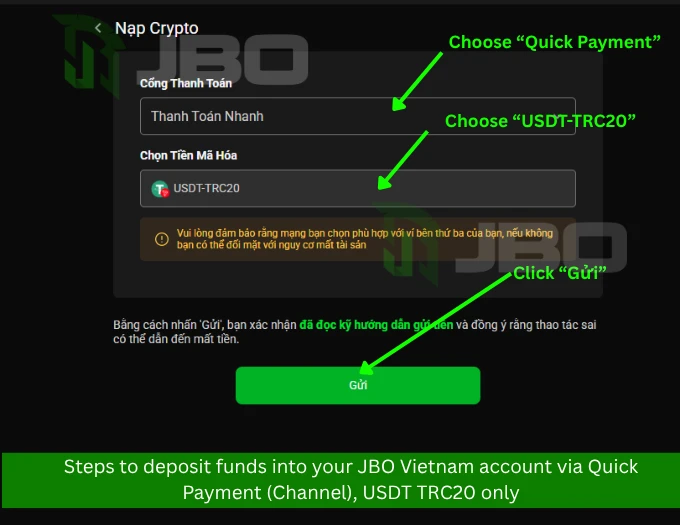
Crypto deposits are a modern option favored by many players for their speed, strong security, and independence from banking systems. JBO Vietnam supports USDT TRC20, USDT ERC20, and BTC, through two deposit options.
Quick Payment (Channel), USDT TRC20 only
- Minimum deposit: 5 USDT TRC20
- Your wallet address is generated specifically for you and may change periodically
- Always check the latest wallet address or QR code before sending funds
- Only send USDT TRC20 to the address shown. Sending the wrong token or using the wrong network can result in permanent loss of funds
- High risk transactions or those involving smart contracts are not supported, and JBO is not responsible for losses resulting from transactions made outside these guidelines
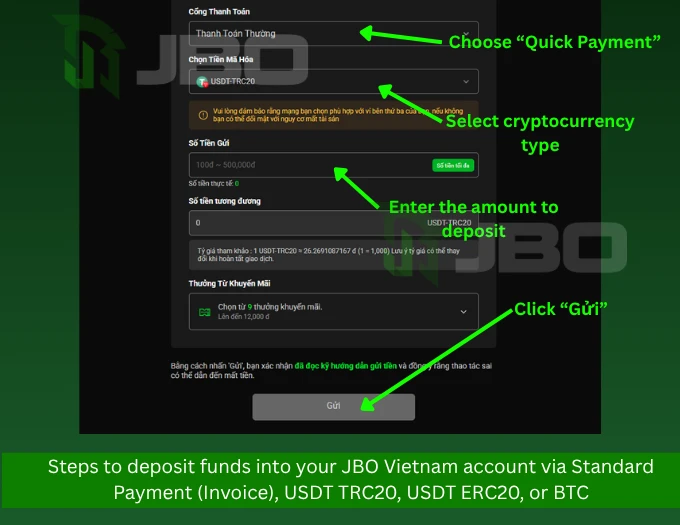
Standard Payment (Invoice), USDT TRC20, USDT ERC20, or BTC
- Choose your preferred network
- Enter the deposit amount as instructed by the system (for example, enter 500 if you want to deposit the equivalent of 500,000 VND)
- After clicking Send, a third party payment window will open to process the transaction
- Upload proof of transfer, such as a screenshot or receipt, to complete verification
Important crypto reminders:
- Double check the token type and network before sending; sending the wrong type can result in lost or unrecognized funds
- Pay the exact amount shown by the system; changing the amount yourself may delay confirmation
- Each wallet address or QR code is for one time use only. Reusing an old address can result in permanently lost funds
- Some wallets or exchanges (such as Binance) charge a network gas fee. Make sure to send enough to cover both your deposit amount and the fee, so the full intended amount reaches your JBO account
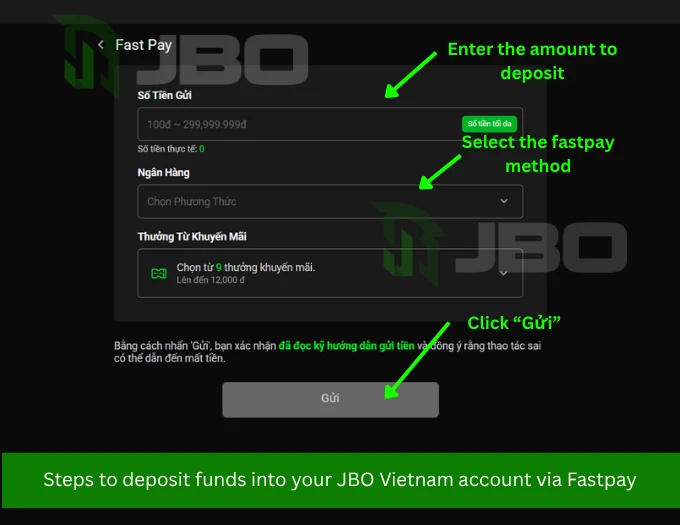
3. Fastpay
- Make sure your bank account has online payment enabled
- Select Fastpay
- Choose your bank
- Enter your deposit amount
- Confirm, then complete your bank login details in the third party window that appears and follow the on screen instructions
- Upload your payment receipt to complete verification
Fastpay transactions are typically processed within about 10 minutes.
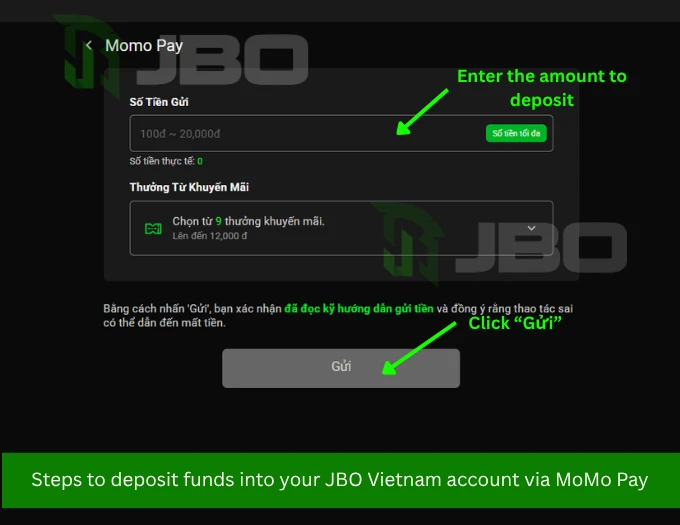
4. MoMo Pay
- Select MoMo Pay
- Enter your deposit amount
- Scan the QR code shown (valid for one use), which can be scanned through VietQR or most supported banking and e wallet apps in Vietnam
- Copy the transfer note if one is provided
- Open the MoMo app and confirm payment
- Upload your payment receipt to complete verification
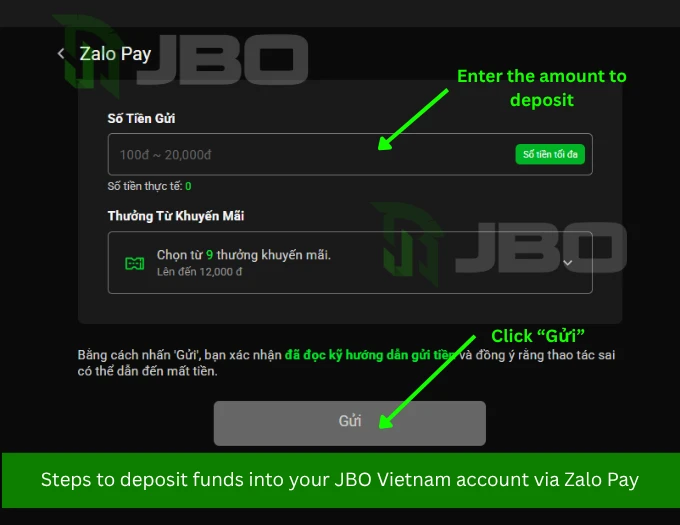
5. Zalo Pay
- Select Zalo Pay
- Enter your deposit amount
- The system will show a QR code or transfer details
- Open Zalo Pay and scan the QR code
- Paste the exact transfer note provided
- Complete the transaction in the Zalo Pay app
- Upload your payment receipt to complete verification
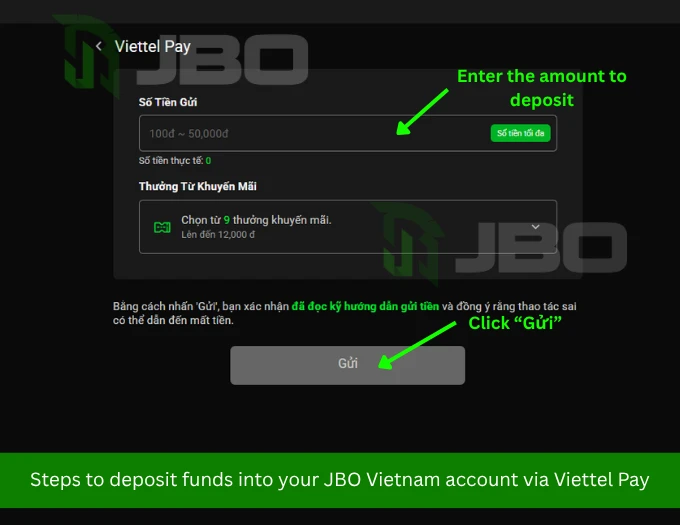
6. Viettel Pay
- Select Viettel Pay
- Enter your deposit amount
- Scan the QR code shown
- Copy and enter the exact transfer note provided
- Complete the transaction in the Viettel Pay app
- Upload your payment receipt to complete verification
7. Phone Top Up Card
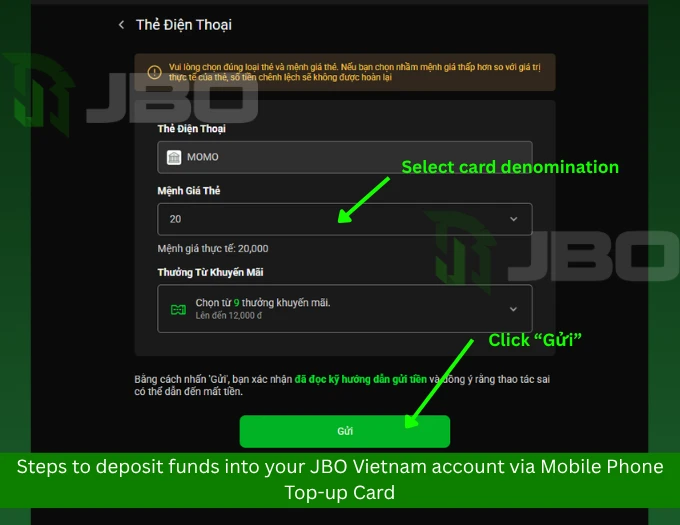
Players can also deposit using a mobile phone top up card. A processing fee of 34% applies, and JBO currently supports MoMo branded cards.
- Select the card type, choose the card’s value, then tap Send
- Enter the serial number and card number, then select your network provider (Zing, Viettel, Vinaphone, Vietnamobile, or Mobifone)
- Tap Top Up to process the transaction immediately
Note: If you select a lower value than intended, the difference won’t be refunded, and the processing fee is deducted directly from the deposited amount.
8. Cash Card (Affiliate Members Only)
This option is available exclusively for affiliate members, and only for cash cards issued by the specific affiliate you registered under.
- Select Cash Card as your payment method
- Enter the amount matching your card’s value (minimum 20,000 VND, maximum 200,000,000 VND)
- Enter the 16 digit serial number
- Enter the 10 digit PIN code
- Tap Send to complete the transaction
Warning: Double check the amount, PIN, and serial number before confirming, since errors in this process can result in permanently lost funds.
How to Deposit on JBO Thailand
1. Crypto Deposits (USDT / BTC)
Crypto deposits are a modern, secure option with no bank imposed limits, and JBO Thailand offers two formats.
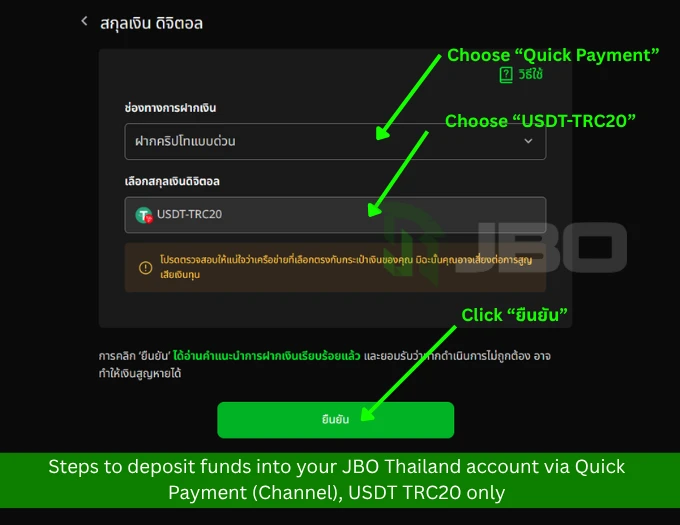
Format 1: Quick Crypto (Channel), USDT TRC20 network only
- Select the Quick Payment crypto option
- The minimum deposit is 5 USDT TRC20
- Your wallet address is unique to you. Always check the latest address before transferring, since it may change periodically
- Send only USDT TRC20 to the address shown; using a different currency or network can result in permanent loss of funds
- Scan the QR code provided to complete the transfer
High risk transactions or those involving smart contracts are not supported, and JBO is not responsible for any resulting loss or damage.
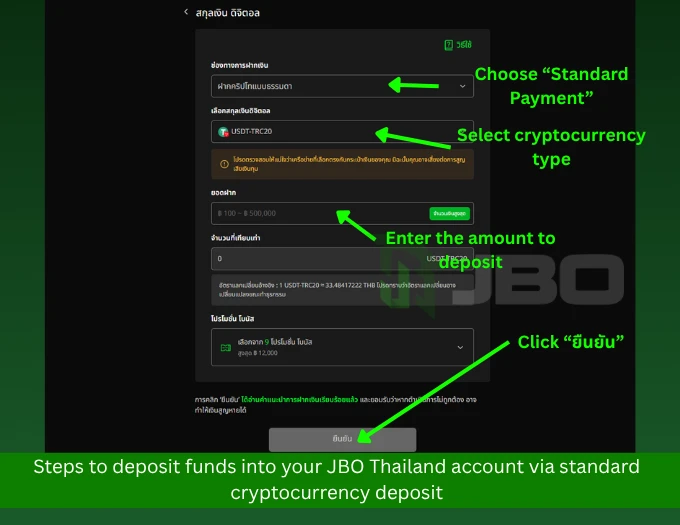
Format 2: Standard Crypto (Invoice), USDT TRC20, USDT ERC20, or BTC
- Select your preferred network (USDT TRC20, USDT ERC20, or BTC)
- Enter the deposit amount as instructed by the system
- Click Send, and a third party payment window will open to process the transaction
- After completing the transfer, upload a screenshot or slip as proof of payment for verification
Crypto deposit reminders for Thailand:
- Some destination platforms or wallets (such as Binance or Bitkub) may charge a gas fee when paying with USDT
- The amount you send should equal your intended deposit plus the fee. For example, if you want to deposit 1,000 USDT and the network fee is 1 USDT, send a total of 1,001 USDT so JBO receives the full 1,000 USDT
2. Local Bank Transfer (Fast Transfer/QR Pay)
This is the simplest, most popular method for Thai players, supporting major banks such as Siam Commercial Bank (SCB), Bangkok Bank (BBL), and TTB, among others.
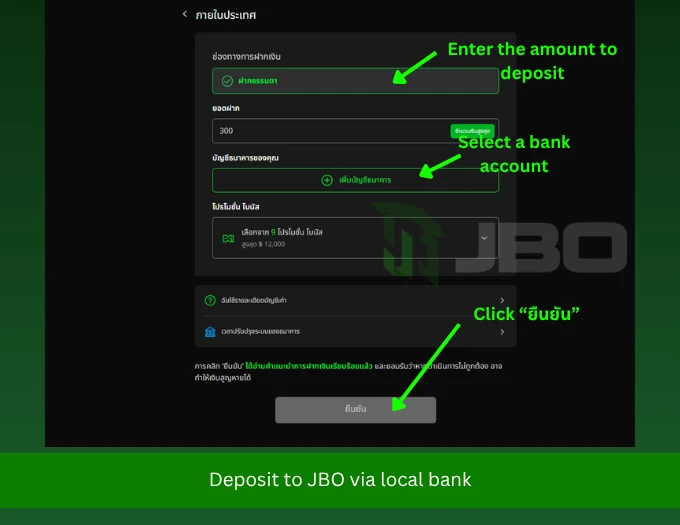
- Go to the Deposit menu and select Local Bank
- Enter the amount you want to deposit and choose your bank
- The system will display a QR code or JBO’s destination bank account details
- Open your mobile banking app, scan the QR code, or transfer manually, making sure to enter the reference note or memo exactly as instructed
- Upload your payment slip on the JBO website and wait for the system to automatically update your balance
Additional tips for Thailand bank transfers:
- Deposits are not currently supported through Boonto, 7 Eleven, TrueMoney Wallet, or AirPay
- For maximum security, the account name used for deposits and withdrawals must match your registered JBO name exactly. Never use someone else’s account
- Double check the destination account name and bank details every time before confirming a transfer
- Upload your slip within 20 minutes of transferring, or the transaction may not be automatically recognized
- You may be asked to transfer an exact decimal amount, such as 99.99 THB instead of a round 100 THB, to help the system match and verify your payment quickly. Always transfer the precise figure shown
- Deposits and withdrawals process fastest between 5:00 AM and 10:00 PM. Transactions between 11:00 PM and 4:00 AM may be slower due to routine bank maintenance
3. Cash Card (Affiliate Members Only)
This method is reserved specifically for affiliate members, using only cash cards issued by the agent they registered under.
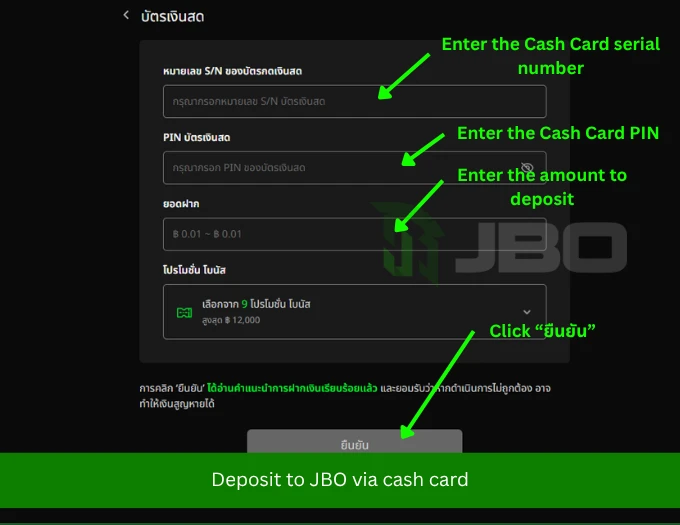
- Select Cash Card as your payment method
- Enter the 16 digit serial number
- Enter the 10 digit PIN code
- Enter the deposit amount (currently limited to 0.01 THB while this feature is in testing)
- Review your details carefully, then click Confirm
Warning: Enter the amount, PIN, and serial number correctly before transferring. Clicking Confirm means you’ve read the instructions and accept that incorrect entries may result in lost funds.
Common Problems with Deposit
Even with a straightforward process, deposits can occasionally run into issues. Here are the most common problems players report and where to go for help.
Funds Not Credited After Payment
If your balance hasn’t been updated after the expected processing time, first double check that you transferred the exact amount and reference note requested by the system. If everything matches and the balance still hasn’t updated, reach out through Contact Us with your payment slip or transaction proof ready so the support team can verify and credit your deposit manually.
Wrong Amount or Reference Note Entered
Entering an incorrect transfer amount or note is one of the most common reasons a deposit gets delayed or flagged for manual review. If this happens, contact support through Contact Us as soon as possible with your transaction details so the issue can be resolved quickly.
Crypto Sent on the Wrong Network
Sending USDT or BTC using the wrong network or token type is one of the few deposit issues that may not be recoverable. Always confirm the network before sending, and if you believe you’ve made an error, contact support immediately rather than attempting another transfer.
Deposit Bonus or Promotion Not Applied
If you expected a deposit bonus that hasn’t appeared in your account, check the current terms and eligibility requirements on the Promotions page, since some offers require opting in before you deposit or meeting a minimum deposit amount.
Account Verification Requested Before a Deposit or Withdrawal
In some cases, JBO may ask you to complete or update identity verification before processing a transaction. This is a standard part of the platform’s security and compliance process. You can find full details in our KYC and AML policy guide.
Unsure Which Payment Method to Use or General Questions
If you’re not sure which deposit method fits your situation, or you have a general question that isn’t covered here, visit our FAQ page for quick answers, or reach out directly through Contact Us for personalized help.
In all cases, keeping a copy of your payment receipt or screenshot makes it much faster for support to verify and resolve any deposit issue.
Frequently Asked Questions
Is depositing with crypto safe on JBO?
Yes. JBO uses encrypted wallets with unique addresses generated for each transaction, providing strong security. That said, you must enter the correct network and wallet address to avoid losing funds.
Can I use a USDT network other than TRC20?
It’s not recommended for Quick Payment deposits, which currently prioritize USDT TRC20 only. Sending funds on the wrong network, such as ERC20 or BEP20, may result in the transaction not being recognized and potential loss of funds.
Can I reuse an old wallet address for future deposits?
No. Each wallet address or QR code is valid for one use only. Reusing an old address can result in lost or unrecognized deposits.
How long does it take for funds to appear in my JBO account?
For bank transfers and QR Pay, funds are usually credited automatically within 1 to 5 minutes. Crypto deposits depend on blockchain confirmation and typically take up to 10 minutes, though network congestion can occasionally extend this.
Can I use a friend’s or family member’s bank account to deposit?
No. JBO requires the bank account used for deposits to match the name registered on your JBO account. Deposits made from an account under a different name typically cannot be credited.
What should I do if I forget to upload my payment slip within 20 minutes on JBO Thailand?
Contact JBO customer support immediately through live chat, with your payment slip and account details ready, so the team can manually verify and credit your deposit.
Are deposit methods the same on JBO Vietnam and JBO Thailand?
No, they differ in several ways. JBO Vietnam supports additional e wallets like MoMo, Zalo Pay, and Viettel Pay, along with phone top up cards, while JBO Thailand focuses on local bank transfer and crypto, with a stricter time limit for slip uploads and a recommended deposit window. Always check the deposit page on your specific regional platform for the most accurate details.
#Sports-Betting
#Casino-Games
#Esports-Betting-page
#Start-betting-on-your-favorite-esports-or-casino-games.