
JBO Login Guide – Complete Guide to Signing In on Web & App
Logging in to JBO only takes a few seconds once you know the right steps, but for players accessing the platform from outside Vietnam or Thailand, small details like link changes, OTP verification, or connection issues can sometimes get in the way. This guide walks you through the full JBO login process on web, mobile browser, and app, along with quick fixes for the most common login errors.
Since the login process is identical across regional platforms, this guide uses JBO Vietnam as the reference, the same steps apply if you’re logging in through JBO Thailand.
Visit JBO official websites based on your location and enjoy sports betting and online live casino experience!
Become JBO Affiliate JBO Thailand JBO VietnamWhere to Find the Correct JBO Login Link
Before logging in, always make sure you’re using a verified, official JBO access link and a registered account, if not, you can register to a JBO account now. Because domains can occasionally change or become temporarily inaccessible depending on your location or internet provider, it’s best to bookmark an updated link rather than searching for one each time. Always double-check the URL to avoid fake or phishing pages impersonating JBO.
Register NowHow to Log In to JBO on the Website
Step 1: Open the Official JBO Website
Use your browser to visit the current, verified JBO link.
Step 2: Click “Login”
The login button is typically located in the top-right corner of the homepage.
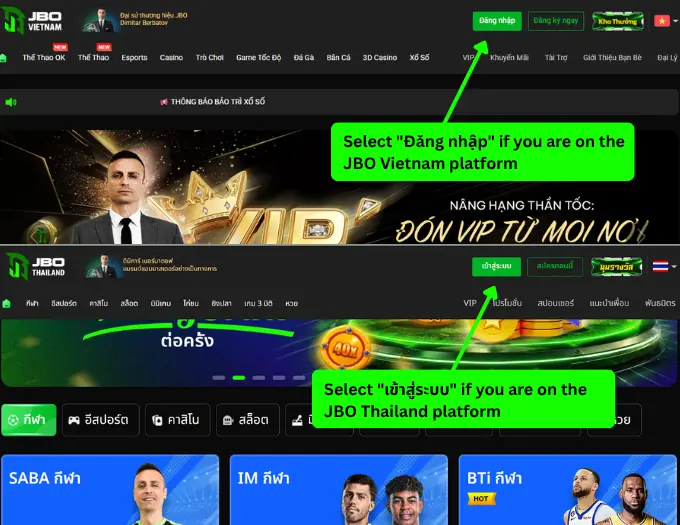
Step 3: Enter Your Account Details
Type in your registered username or phone number, followed by your password.
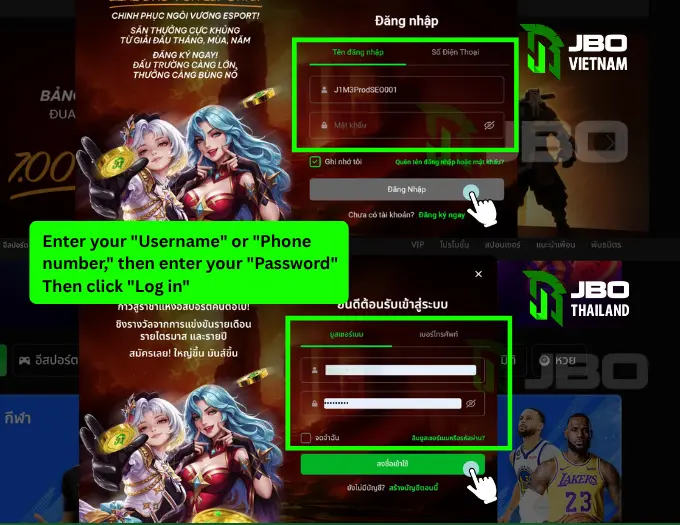
Step 4: Confirm and Sign In
Click “Login” again to access your account. You’ll be redirected straight to the game lobby, where you can browse sports odds, casino tables, or slot titles.
Tip: JBO passwords are case-sensitive, so double-check capitalization before submitting.
How to Log In to JBO on Mobile Web (No App Needed)
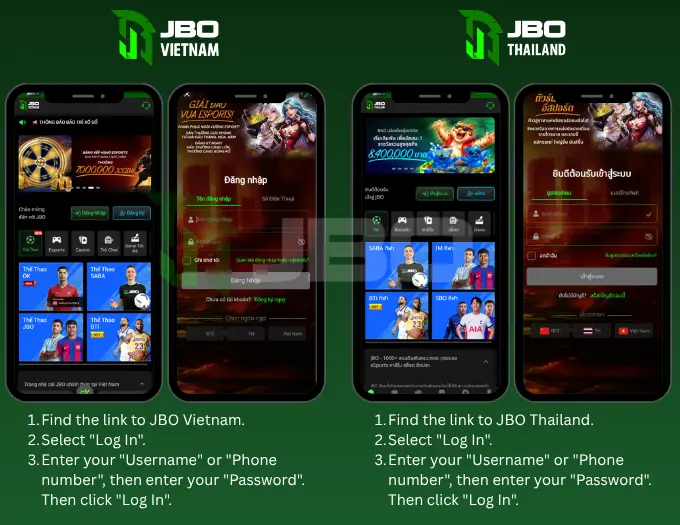
If you’d rather not install the app, you can log in directly through your phone’s browser:
- Open your mobile browser and go to the official JBO website.
- Tap the Login button on the mobile homepage.
- Enter your username or registered phone number, along with your password.
- Tap Login to enter your account.
The mobile web version is optimized for both Android and iOS, so the experience stays smooth even without downloading anything.
How to Log In to JBO Through the Mobile App
For faster access and a more stable connection, many players prefer using the dedicated JBO app.
Step 1: Download the App
If you haven’t installed it yet, visit the official JBO website and select the JBO app download option. The system will automatically detect your device and provide the correct version for Android or iOS.
Step 2: Open the App and Sign In
Enter your username or registered phone number along with your password, then tap Login to access your account.
Many devices also support Remember Me, Face ID, or Fingerprint Login, convenient shortcuts if you’re using your own personal device.
Common Reasons You Can’t Log In to JBO
| Issue | Likely Cause | How to Fix It |
| “Incorrect username/password” | Typing mistake or wrong capitalization | Re-check your details carefully and try again |
| Forgotten password | Can’t recall login credentials | Use the “Forgot Password” recovery option |
| Account temporarily locked | Too many failed login attempts | Wait a short while, then retry or contact support |
| Login page won’t load | Weak or unstable internet connection | Switch networks or refresh the page/app |
| Access restricted in your region | Local network limitations | Use an updated access link or contact customer support |
What to Do If You Forgot Your JBO Password
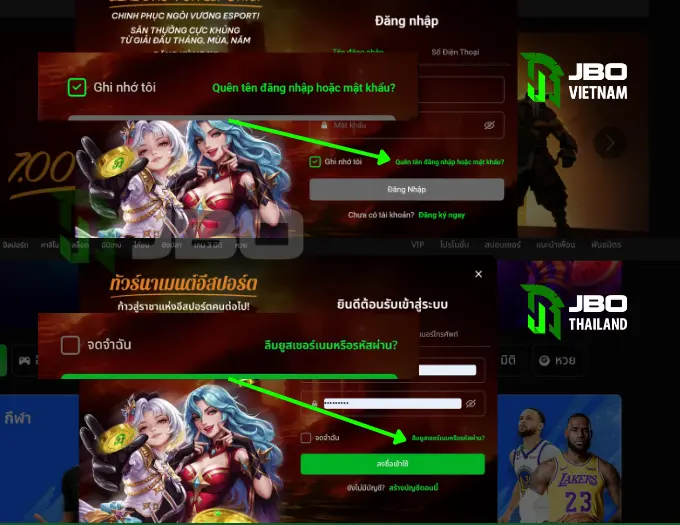
- Go to the JBO login page and select Forgot Password.
- Enter your registered phone number or email address.
- Verify your identity using the OTP code sent to you.
- Create a new password and confirm it.
- Log back in using your updated credentials.
Choose a password that’s easy for you to remember but difficult for others to guess, ideally a mix of letters, numbers, and at least one special character.
Forgot Your Username? Here’s How to Recover It
If you’ve also forgotten your registered username:
- Select Forgot Username on the login page.
- Enter the email address linked to your account.
- JBO will send your account details to that email.
Keeping Your JBO Login Secure
A few simple habits go a long way in protecting your account:
- Log in only through official JBO links
- Avoid signing in over public or unsecured Wi-Fi
- Never share your password or OTP code with anyone
- Log out after each session, especially on shared or public devices
- Update your password periodically
- Watch for unusual login alerts and report them to customer support immediately
JBO also applies platform-side protections, including data encryption, OTP verification, abnormal login monitoring, and identity (KYC) checks, to keep player accounts and transactions secure.
Need Help Logging In?
If you continue to experience login issues, whether related to forgotten credentials, OTP verification, account restrictions, or KYC, JBO’s customer support team is available 24/7 via live chat or email to help resolve the issue quickly.
Frequently Asked Questions
Why can’t I log in to my JBO account?
This is usually caused by incorrect login details, a weak internet connection, too many failed attempts, or temporary access restrictions in your region.
What should I do if I forgot my JBO password?
Select “Forgot Password” on the login page, verify your identity via OTP, and create a new password to regain access.
Is OTP required to log in to JBO?
OTP isn’t always required for standard logins but may be requested for identity verification or added account security in certain cases.
Do I need to complete KYC before logging in?
No. You can log in normally without KYC verification, though it’s typically required before withdrawing funds or increasing transaction limits.
#Sports-Betting
#Casino-Games
#Esports-Betting-page
#Start-betting-on-your-favorite-esports-or-casino-games.